
Microsoft Project
Import a plan without rebuilding it. Hierarchy, all four dependency types, constraints and resource allocations come across intact, and the schedule recalculates against your own work calendars from then on.
ENEnglishIntegrations
Twenty-one integrations switch on inside Celoxis - plans, files, issues, tickets, time and sign-in. Zapier and the REST API reach the rest, so nobody retypes a status update to keep the portfolio current.
Three routes
The route decides how much work the connection is, who maintains it and how much of the data moves. Start at the first and work right; most requirements are met before the third.
Built and maintained by Celoxis for the systems a portfolio depends on. Configured once by an administrator, and they move structure, not just records.
See the libraryA trigger in one app, an action in the other, no code on either side. This is the route for the long tail: helpdesks, forms, spreadsheets and the one internal app nobody else has.
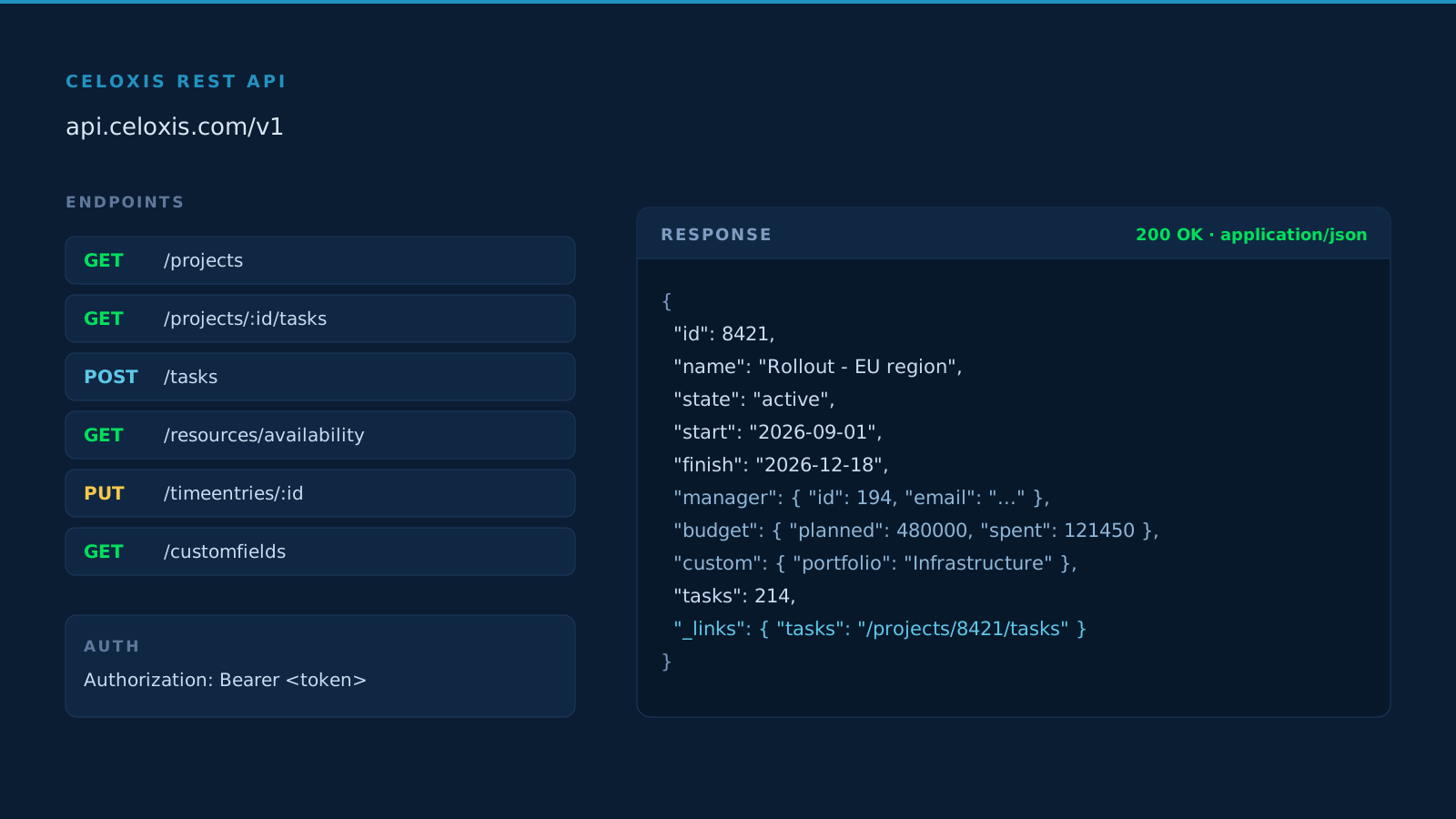
Browse recipesWeb-based and platform independent. Read and write projects, tasks, resources, time and custom fields from any system that can make an HTTP request.
Read the docsThe library
Twenty-one of them, ordered by how often accounts ask for them - the plan, the file store, the issue tracker, the CRM and the ledger first. An administrator switches one on and it runs unsupervised from then on. Where an integration has its own setup page, the card links to it.
400+Apps connected
Twenty-one integrations are configured from inside Celoxis. The rest arrive through Zapier and the API, which is where the other three hundred and seventy-nine live.
Import a plan without rebuilding it. Hierarchy, all four dependency types, constraints and resource allocations come across intact, and the schedule recalculates against your own work calendars from then on.

Complete two-way CSV import and export - tasks, resources, time, expenses and custom fields. Move a spreadsheet in, or take a filtered report back out to Excel in one step.

Work on tasks, workflows and project discussions from the inbox. Alerts and change notifications arrive as email, and replies post back against the item they came from.

Link documents you already have in Drive to projects, tasks, discussions and workflows. The file stays in Drive with its own permissions; Celoxis holds the reference.

Map Jira issues to Celoxis tasks so engineering work shows up in the portfolio without a second status report. Create the issue in Jira, track the delivery date in Celoxis.

Sales and delivery read the same record. Initiate, assign and track customer projects from inside Salesforce, so a won opportunity becomes a resourced project without a hand-off.

Transfer approved time entries into QuickBooks Online so project billing stays in sync between the two systems. One-click setup, then time flows across on every approval.

Turn a starred chat into a structured task with an owner and a date, so the decision made in a channel does not stay in the channel.

Several thousand more apps, no code. A bug in Jira becomes a task, a form submission becomes a project, a milestone date becomes a calendar reminder.

Create Trello cards from Celoxis tasks and keep the visual board your team prefers, while the dates and dependencies stay in the plan.

Raise a task from a Zendesk ticket automatically, so customer follow-ups are scheduled work rather than a queue someone has to remember.

Single sign-on through Okta, with provisioning handled where the rest of your identity is managed. One less password for every user on the account.

Move rows from a sheet into Celoxis projects or tasks, so a tracker maintained in Sheets stops being a second plan nobody reconciles.

Publish Celoxis events and task dates to Google Calendar or Outlook through an iCal feed, so commitments appear where people already look.

Map repository issues to Celoxis tasks and keep code work and delivery dates in one place rather than two backlogs.

Bring work items across as tasks so the engineering backlog stays visible in the portfolio without a manual status roll-up.

Raise a task from a Freshdesk ticket and keep customer follow-ups on someone’s plan, with a date attached.

Sync Harvest time entries into Celoxis so utilisation, cost and margin report from one set of numbers.

Turn a note into an actionable task with an owner and a due date, so an idea captured in a meeting survives it.

Manage survey responses as tasks, so what respondents asked for becomes scheduled work instead of a spreadsheet.

Connect campaign activity to the projects that deliver it and keep marketing work in the same plan as everything else.
Single sign-on
Users reach Celoxis with the credentials they already have, and access ends when the directory says it does. This is an administrator decision worth settling before anyone is invited - it is easier to make once than to change later.
Any compliant identity provider, configured once per account. Assertions carry the attributes Celoxis needs, so a new starter arrives with a role rather than an invitation.
See security detailsSet up directly: Okta, Microsoft Active Directory through ADFS, and Google accounts. Roles and permissions map to directory groups, and a leaver loses access the moment the directory removes them.
Ask about your providerAccess management through the portal your organisation already runs, so Celoxis is one less credential for every user on the account and one less thing for IT to reset.
Start a trialCeloxis API
Celoxis' API is web-based and platform independent, so any system that can make an HTTP request can read and write project data. It is the route for reporting warehouses, internal portals and the automations specific to how your organisation runs.
Frequently Asked Questions
Panels open independently and the first one is open on load.
Over 400. A native integration is built and maintained by Celoxis for the systems most portfolios depend on - Microsoft Project, Excel, Microsoft 365, Google Drive, Salesforce, QuickBooks Online and the identity providers. Everything else connects through Zapier or the REST API.
The structure, not just the task list: the full work breakdown hierarchy, all four dependency types with lead and lag, constraints and resource allocations. After the import the schedule recalculates in Celoxis against your own work calendars.
SAML 2.0 covers any compliant provider. Okta, Microsoft Active Directory through ADFS, Google, OneLogin and Bitium are set up directly, and access stays managed where the rest of your identity is managed.
A trigger in one app runs an action in the other, with no code on either side. A bug filed in Jira creates a Celoxis task, a submitted form creates a project, an approaching milestone adds a calendar reminder.
The API is web-based and platform independent, so any system that can make an HTTP request can read and write project data - projects, tasks, resources, time entries, expenses and custom fields, through the same permissions the interface applies. It is where reporting warehouses, internal portals and bespoke automations connect.
Check Zapier first, since the catalogue there is several thousand apps deep. If the connection needs to be exact, the API covers it. Tell us what you are connecting and we will confirm which route fits before you build anything.
Import a real plan, point Celoxis at the systems your teams already use, and watch capacity, cost and reporting move together. Fourteen days, no credit card, nothing to install.